After creating your Npati account, the next step is to complete your profile.
Your Npati profile is your identity across the marketplace and social features of the platform. It can help buyers understand who they are communicating with, make your listings easier to connect with your account and give other users a place to discover your public content.
You can add a profile photo, name, username, phone number, profile title, location, bio, external links and interest tags.
For users in the United States, completing your profile is especially useful if you plan to post listings, sell items locally, communicate with buyers or build a recognizable presence on the Npati marketplace.
If you do not have an account yet, start with our How to Create a Npati Account guide. After registration, return to this guide to finish setting up your profile.
What Is a Npati Profile?
Npati combines marketplace features and social networking tools in one platform.
You can create marketplace listings, upload photos, publish videos and Shorts, follow users, send messages and interact with other people.
Your profile connects much of this activity to one identity.
Instead of being only an account settings page, your Npati profile can become the place where other users recognize you, discover your marketplace activity and learn more about you.
This is why completing your profile is a useful step before you begin selling actively.
Open Your Npati Profile
After signing in, open the profile page for your Npati market:
United States:https://www.npati.com/profile
Canada:https://www.npati.com/ca/profile
United Kingdom:https://www.npati.com/gb/profile
The profile features are the same across these Npati markets.
From your profile page, you can edit your profile photo, first and last name, username, phone number, profile title, location, bio, profile links and interest tags.
This is your personal profile management page. Use it when you want to update your account information or change how your profile appears on Npati.
Other users do not use these URLs to view your public profile.
Your Public Npati Profile
Npati also provides a public profile page that other users can visit.
Your public profile URL is based on your username.
For example, if your username is:
npati
your public profile is:
For other accounts, the same structure is used:
https://www.npati.com/@username
This is an important difference to remember.
Your personal profile management page:https://www.npati.com/profile
This is where you edit your own information.
Your public profile page:https://www.npati.com/@username
This is the page that other Npati users can visit.
For example, when buyers find one of your marketplace listings, they may also visit your public profile to learn more about your account and see other public activity.
How to Edit Your Npati Profile
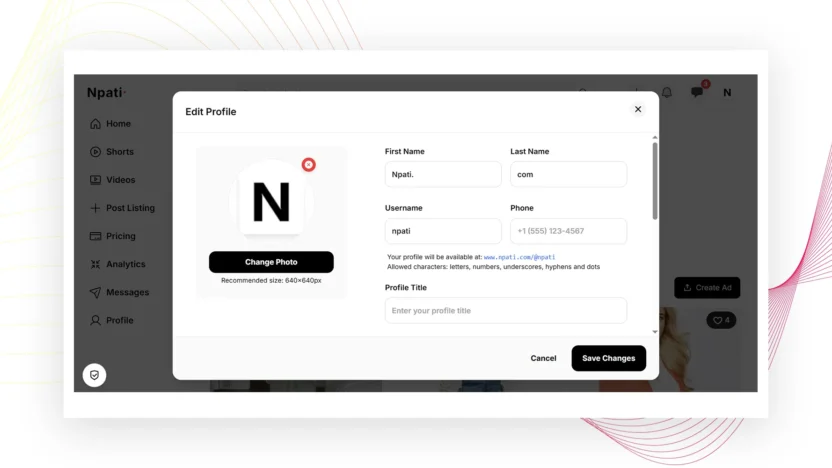
Go to your personal profile page and select Edit Profile.
You will then be able to update the information associated with your profile.
The available fields include Profile Photo, First Name, Last Name, Username, Phone, Profile Title, Location, Bio, Profile Links and Interest Tags.
You do not need to fill every optional field immediately, but completing the most important information can make your profile more useful and recognizable.
Add a Profile Photo
One of the first things you should add is a profile photo.
Select Change Photo and upload your image.
The recommended profile image size is:
640 × 640 pixels
A square photo is recommended so it displays correctly throughout Npati.
If this is a personal account, you can use a clear photo of yourself. If you use Npati for a company, store or brand, you may choose an appropriate business image or logo.
Your profile photo is not only a visual detail. It also affects your eligibility to appear in the author carousel on the Npati homepage.
Profile Photo and the Npati Author Carousel
If you want your profile to be eligible to appear in the author carousel on the Npati homepage, you need to meet two requirements:
- Your account must have a profile photo.
- Your account must have at least one active listing.
If you do not upload a profile photo, your profile will not appear in the author carousel.
You also need at least one active marketplace listing.
For a new user, the recommended sequence is simple: create your Npati account, upload your profile photo, complete your profile and publish your first listing.
Once your account has a photo and at least one active listing, it can become eligible for the homepage author carousel.
Add Your First Name and Last Name
The First Name and Last Name fields allow you to add your name to the profile.
Enter information that accurately represents you or the account you are managing.
For example:
First Name: Npati
Last Name: com
For personal seller accounts, your real name or the name you normally use online may be appropriate.
For a brand or business profile, use information that makes the account easy for customers to recognize.
Choose Your Npati Username
Your username is especially important because it becomes part of your public profile URL.
For example:
Username:
npati
Public profile:
Allowed username characters include letters, numbers, underscores, hyphens and dots.
Choose a username that is easy to read, remember and share.
If you are building a seller profile, creator profile or business presence, it can be useful to choose a username that matches the name people already associate with you.
Your public Npati profile URL can then be shared with buyers, followers or other people who want to find your profile directly.
Add Your Phone Number
The Phone field lets you add a phone number to your profile information.
For a US account, a number might appear in a format such as:
+1 (555) 123 4567
Before adding personal contact information, consider what information you want associated with your account and what you are comfortable sharing.
For marketplace conversations, Npati Messages can also be used to communicate with buyers and sellers directly through the platform.
Add a Profile Title
The Profile Title field gives visitors a quick idea of what your account is about.
A good profile title should be short and descriptive.
For example, a seller might use:
Used Furniture Seller
A technology enthusiast could use:
Electronics & Computer Parts
A local seller might use:
Local Home & Garden Seller
A creator might use:
Marketplace & Video Creator
Your profile title does not need to contain many SEO keywords. Its main purpose is to help people quickly understand your profile.
Add Your Location
Npati includes a Location field in your profile.
For users in the United States, you can enter a relevant city and state, such as:
Austin, Texas
Miami, Florida
Chicago, Illinois
Seattle, Washington
Location information can be especially useful when you use Npati as a local marketplace.
Someone interested in one of your items for sale can quickly understand the general area connected to your profile.
Use accurate location information that is appropriate for your account.
Write Your Npati Bio
The Bio field lets you tell other users a little more about yourself.
You do not need a long description.
A short, natural introduction is usually better.
For example:
I sell used furniture and home decor in the Austin area. Follow my Npati profile to see new listings, photos and videos.
Another example could be:
Technology enthusiast listing used computers, electronics and components. Check my active listings or send me a message if you have questions about an item.
Your bio can briefly explain what you sell, what kind of content you publish, your interests or the area where you are active.
Keep it natural. Do not fill your bio with repetitive marketplace keywords.
Add Up to 5 Profile Links
Npati also allows you to add external links to your public profile.
Select Add link in the Profile Links section.
You can add up to 5 links.
These links can be useful if you want to connect your Npati profile with your website, portfolio, blog, business website or other relevant public pages.
Public profile links open in a new browser tab.
Npati applies nofollow to these links for SEO.
This means you can use the feature to give visitors useful additional resources without treating those links as standard SEO endorsements.
Use your five available links for websites or profiles that are genuinely relevant to people visiting your Npati account.
Add Interest Tags
Npati profiles also support Interest Tags.
You can add up to 10 interest tags.
Tags help describe your interests and can help other users discover you based on shared topics.
For example, a user might add tags related to electronics, furniture, cars, fashion, gaming, collectibles, photography or home decor.
Choose tags that accurately describe your interests, marketplace activity or the content you publish.
Relevant tags are more useful than adding unrelated popular terms.
Video: How to Set Up Your Npati Profile
Watch this video to see how to set up and edit your Npati profile step by step.
In the video, you will see how to open your personal profile at npati.com/profile, upload a profile image, edit your name and username, add your location and bio, add profile links and choose interest tags.
The video will also show the difference between your personal profile management page and the public profile page that other users can visit.
What to Do After Completing Your Profile
After your profile is ready, the next important step is creating your first marketplace listing.
A useful listing should clearly explain what you are selling and include accurate information about the item.
Add a clear title, description, price, location and good photos. If video helps show the condition or features of the item, you can also use Npati video features.
For local marketplace users in the USA, accurate information can make it easier for potential buyers to understand the item before contacting you.
Having at least one active listing is also required if you want your account to become eligible for the Npati homepage author carousel.
Build a Better Npati Seller Profile
Your public marketplace profile can help buyers decide whether they want to contact you.
A profile with a recognizable image, useful bio, appropriate location and accurate listings gives visitors more context than an almost empty account.
Keep your information current.
If an item is no longer available, update your listing. If a buyer sends a question, respond clearly through Npati Messages.
If you regularly post marketplace listings, photos, videos or Shorts, your profile can gradually become a central place where users discover your activity.
Frequently Asked Questions About Npati Profiles
Where can I edit my Npati profile?
After signing in, open:
This is your personal profile management page where you can edit your photo, name, username, phone number, title, location, bio, profile links and interest tags.
What is my public Npati profile?
Your public profile is the page other users can visit.
The URL uses your username.
For example:
If your username is different, replace npati with your own username.
Is npati.com/profile my public profile?
No.
https://www.npati.com/profile is the page you use to manage and edit your own profile.
Your public profile uses the format:
https://www.npati.com/@username
What profile photo size does Npati recommend?
The recommended profile image size is 640 × 640 pixels.
Do I need a profile photo?
A profile photo is important for presenting your account to other users. It is also required if you want your account to be eligible for the author carousel on the Npati homepage.
How do I appear in the Npati author carousel?
Your account must have a profile photo and at least one active listing.
How many links can I add to my Npati profile?
You can add up to 5 profile links.
Public links open in a new tab and use nofollow for SEO.
How many interest tags can I add?
You can add up to 10 interest tags to your Npati profile.
Can I add my location to Npati?
Yes. The profile editor includes a Location field. For US users, you can enter an appropriate location such as a city and state.
Complete Your Npati Profile and Start Using the Marketplace
Completing your profile is an important step after registering on Npati.
Start by opening your personal profile page at:
Upload a clear profile photo, review your name and username, add your profile title and location, write a short bio and add relevant interest tags.
You can also connect up to five external links.
Remember that your personal profile management page and public profile are different.
You edit your account at:
Other users visit your public profile at:
https://www.npati.com/@username
If you want your profile to become eligible for the Npati homepage author carousel, make sure you have both a profile photo and at least one active listing.
If you are new to Npati, begin with our How to Create a Npati Account guide. Once your profile is complete, continue by creating your first listing and start exploring the Npati marketplace, videos, Shorts, messages and social features.