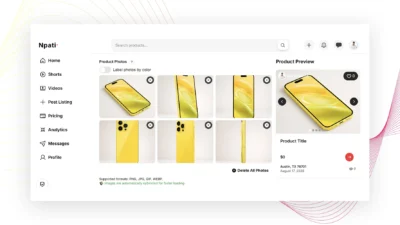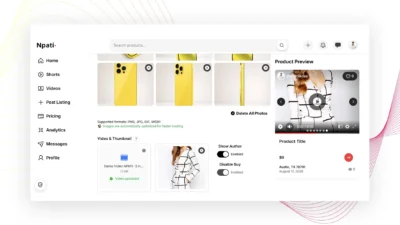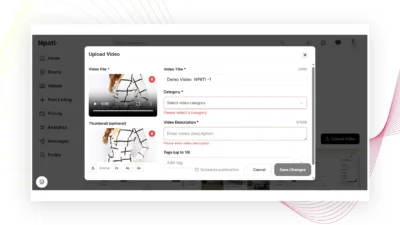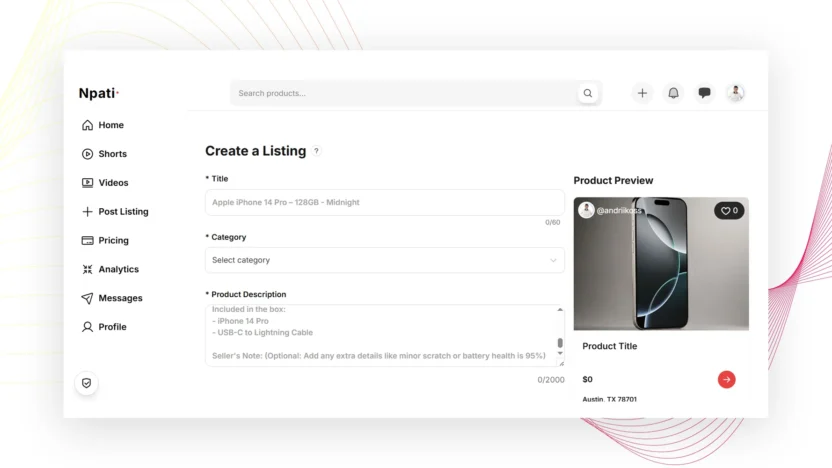
Creating a listing is only the first step. If you want more people to understand what you are selling, spend time viewing your product and feel confident enough to contact you, you need to make the listing as complete, clear and useful as possible.
A better Npati listing starts with a descriptive title, the correct category, a useful product description, accurate condition information, realistic pricing, clear photos, relevant tags and, whenever possible, video.
The basic rule is simple:
Complete and optimize every relevant field available in your Npati listing.
Do not leave useful information empty if you already know it. The more accurately you describe the product, the easier it is for buyers to understand what you are offering.
If you have not created a listing before, first read our complete How to Create a Listing on Npati guide. It explains every field in the listing form and shows the three different ways you can present a listing on Npati.
This guide focuses on the next step: how to make that listing better.
Quick Answer: What Makes a Good Npati Listing?
A strong Npati listing should quickly answer the most important questions a buyer may have:
- What is being sold?
- What brand and model is it?
- What condition is it in?
- What are its main features?
- What is included?
- Are there any defects or visible wear?
- How much does it cost?
- Where is it located?
- What does the actual product look like?
- Can the buyer see it working in a video?
- How can the seller be contacted?
Ideally, a buyer should understand most of the product without needing to send you a message asking for basic information.
That is why completing all relevant listing fields is important.
1. Complete Your Npati Account Before Selling
A good listing starts before you even open the listing form.
If you are new to Npati, complete your account setup first.
The recommended order is:
- Create your Npati account
- Set up your Npati profile
- Add an address to your Npati account
- Create your first Npati listing
- Optimize the listing using the recommendations in this guide
Your profile matters because buyers may visit it after discovering one of your products.
A completed profile with a recognizable photo, username, location, bio and relevant information can give buyers more context about the person or business behind a listing.
Your saved address is also important because an address is required when creating a marketplace listing on Npati.
2. Use Every Relevant Listing Field
One of the easiest ways to improve a Npati listing is also one of the most frequently overlooked:
Fill in every field that is relevant to the product.
Depending on what you are selling, this may include:
- Title
- Category
- Product description
- Product photos
- Photo color information
- Video
- Video thumbnail
- Product or Post mode
- Price
- Discount price
- Free option
- Product sizes
- Location address
- Product condition
- Contact phone
- Tags
Not every field will apply to every product.
For example, shoe sizes may be important for sneakers but irrelevant for a laptop. Color labels may be useful for clothing available in multiple colors but unnecessary for a single used table.
The goal is not to fill fields with unnecessary information.
The goal is to make sure that every useful field is completed accurately.
3. Write a Clear Npati Listing Title
Your title is one of the first pieces of information people see.
Npati listing titles can contain up to 60 characters, so use that space carefully.
A useful title should immediately explain what the product is.
Instead of:
Phone for Sale
write something more specific:
Apple iPhone 14 Pro 128GB Midnight
Instead of:
Nice Sofa
consider:
3 Seat Gray Fabric Sofa in Good Condition
Depending on the product, a useful title can contain:
- Brand
- Product name
- Model
- Size
- Storage capacity
- Important variant
- Color
- Condition
Put the most important information first.
Avoid adding unrelated search terms or repeating the same word several times.
A title should be written for a real buyer first.
4. Choose the Correct Category
Npati can suggest a category based on your listing title, but you should always check the suggested category before publishing.
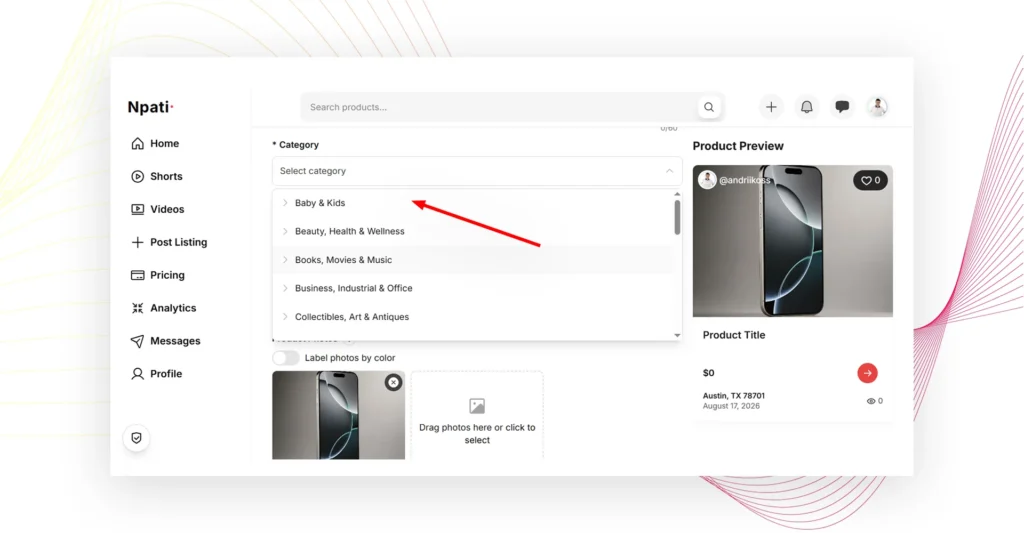
The correct category helps place your product where interested buyers are more likely to look for it.
For example, an iPhone should be placed in the appropriate smartphone category rather than a general electronics category if a more specific option is available.
Do not select a popular category simply because you think it may receive more traffic.
Relevance is more useful than unrelated visibility.
Before publishing, ask:
If I were searching for this product, which category would I check first?
That is usually where your listing belongs.
5. Write a Better Product Description
The Product Description field on Npati allows up to 2,000 characters.
You do not always need to use every character, but you should provide enough information for someone to understand the product.
A useful description should be clear, specific and honest.
You can structure it like this:
Product Overview
Explain what the item is and why you are selling it.
Key Features
List the most important specifications or features.
Condition
Clearly explain whether the item is new or used and describe visible wear.
Included
Tell buyers what comes with the product.
Additional Details
Include measurements, technical information, compatibility information, pickup details or anything else that may help the buyer.
Seller Note
Add useful information that does not fit into the sections above.
Example of a Weak Description
Good iPhone for sale. Works fine. Message me.
This tells the buyer very little.
Example of a Better Description
Apple iPhone 14 Pro with 128GB of storage in Midnight. The phone is fully functional and has been used regularly. The display, cameras, speakers and buttons are working properly.
Condition:
Used, with light cosmetic wear from normal use. Please check the photos and video for the current condition.
Included:
iPhone 14 Pro and charging cable.
Storage:
128GB
Color:
Midnight
Seller Note:
The phone is available for inspection. Send me a message on Npati if you need additional information about the device.
The second description gives the buyer much more useful information.
6. Write for Buyers, Search and AI Systems at the Same Time
You do not need to write separate descriptions for people, search engines and AI systems.
A clear description can help all three understand the listing.
Use specific product information consistently.
For example, instead of writing:
This is a really good device with many features.
write:
Apple iPhone 14 Pro 128GB with a 6.1 inch display, triple camera system and Midnight finish.
Specific information creates more context.
When appropriate, naturally mention:
- Product type
- Brand
- Model
- Condition
- Size
- Capacity
- Material
- Color
- Important specifications
- Location
- Included accessories
Do not repeat the same keyword again and again.
Natural language with clear facts is better than keyword stuffing.
7. Be Honest About Product Condition
Condition is especially important when selling used products.
Do not hide scratches, dents, stains, missing accessories or known problems.
If something is damaged, mention it in the description and show it in the photos or video.
For example:
Small scratch on the lower right corner of the frame. The scratch is cosmetic and does not affect operation. See photo 5 for a close view.
This is much more useful than allowing the buyer to discover the problem later.
Accurate condition information can also reduce unnecessary questions.
8. Add Multiple Real Product Photos
Npati allows you to add up to six product photos.
Use those available photo positions when they help buyers understand the product.
Instead of uploading six nearly identical pictures, show different useful views.
For a physical product, consider showing:
- Front
- Back
- Left or right side
- Important details
- Accessories
- Scratches, damage or other condition details
Use clear photos of the actual item whenever possible.
Make the product the main subject of the image and avoid backgrounds that make it difficult to see.
If your listing includes several colors, Npati also allows you to label photos by color.
9. Add Video Whenever Possible
Photos are important, but video can show things that a static image cannot.
People often want to see a product in motion, inspect it from different angles or watch it working before contacting a seller.
Video is especially useful for:
- Electronics
- Cars and other vehicles
- Furniture
- Tools
- Appliances
- Clothing
- Shoes
- Collectibles
- Equipment
- Products with moving parts
For example, if you are selling a laptop, show it turning on.
If you are selling a car, show the exterior, interior and engine running.
If you are selling furniture, walk around the item so the viewer can better understand its dimensions and condition.
If you are selling clothing, video can help show how the fabric looks when it moves.
Npati supports listing video uploads up to 2 GB.
For many products, photos plus video provide a stronger presentation than photos alone.
10. Choose a Good Video Thumbnail
When you upload a video, Npati can automatically create a thumbnail.
You can also select a different frame from the video.
Choose a frame that clearly shows the product.
Avoid a thumbnail where:
- The product is blurry
- The product is outside the frame
- The camera is moving
- The product is too small
- The frame is dark
- The most important part of the item is hidden
Someone should be able to look at the thumbnail and immediately understand what the video is showing.
11. Use the Three Npati Listing Presentation Formats
Npati provides three ways to visually present a listing.
The complete setup process is explained in How to Create a Listing on Npati.
Option 1: Photos Only
You can create a traditional marketplace listing using up to six photos.
This works well when images can clearly show everything the buyer needs to see.
Option 2: Photos, Video and Thumbnail
You can combine up to six product photos with video.
For many products, this is the most complete presentation because buyers can inspect detailed photos and also watch the product in a video.
Option 3: Video Focused Listing
You can also create a listing that focuses primarily on video.
In this format, video receives more visual emphasis.
This can work particularly well for products that are easier to understand when shown in action.
12. Consider Three Different Listing Approaches
If you have inventory that supports multiple separate listings, different product variants or several similar items, do not make every listing look and sound exactly the same.
Create distinct listings with different writing and presentation approaches.
A useful strategy is to test three styles.
Style 1: Search Focused Listing
Use a precise title and factual description.
Example title:
Apple iPhone 14 Pro 128GB Midnight Unlocked
Focus the description on:
- Brand
- Model
- Specifications
- Storage
- Condition
- Included accessories
This style works well with the Photos Only presentation.
Style 2: Buyer Focused Listing
Write naturally and explain why the product may be useful to the buyer.
Example opening:
Looking for a compact iPhone with a premium camera and plenty of storage? This iPhone 14 Pro has 128GB of storage and is ready for everyday use.
Then provide all factual details.
This style can work well with Photos, Video and Thumbnail.
Style 3: Video Focused Listing
Keep the text clear and concise, then let the video demonstrate the product.
Example opening:
Watch the video to see the current condition and the phone working before contacting me.
Then include the most important specifications, condition and what is included.
This works naturally with the Video Focused Listing format.
Do not simply publish three identical copies of one unique item.
If you create multiple valid listings for different products, inventory units or variants, make each listing genuinely useful and distinct.
Change the writing angle, media and information according to what you are actually selling.
13. Set a Realistic Price
A good description and professional video will not help much if the price does not make sense for the product.
Consider:
- Product condition
- Age
- Brand
- Model
- Current market value
- Included accessories
- Visible damage
- Local demand
If you use a Discount Price, make sure the discount accurately represents the offer.
If you want to give an item away without charging for it, use the Npati Free option instead of trying to create a normal price.
14. Add Sizes and Measurements When Relevant
Measurements can answer questions before buyers need to ask them.
For clothing, include relevant size information.
For furniture, add dimensions.
For equipment, include measurements when they affect transportation, storage or compatibility.
For example:
Width: 72 in
Height: 34 in
Depth: 32 in
Someone buying a sofa can immediately check whether it will fit in their home.
Specific information is more useful than writing:
Normal size sofa.
15. Use the Correct Location
Location matters for local marketplace listings.
Npati uses your saved address when creating listings.
If you have not configured one yet, follow the How to Add an Address to Npati guide before creating your listing.
Make sure the selected address corresponds to the location of the product.
Accurate location information helps buyers understand where the item is available.
16. Add Relevant Tags
Npati allows up to 10 listing tags.
Use tags that genuinely describe the item.
For an iPhone 14 Pro listing, examples could include:
- iphone
- apple
- smartphone
- iphone 14 pro
- 128gb
- unlocked phone
Do not use unrelated popular tags simply to attract additional views.
A smaller number of highly relevant tags is more useful than filling the field with unrelated search terms.
17. Complete Your Seller Profile
Your listing and profile work together.
A buyer who finds your product may also open your public profile.
A completed seller profile can include your:
- Profile photo
- Name
- Username
- Profile title
- Location
- Bio
- Profile links
- Interest tags
If you have not completed yours yet, read How to Set Up Your Npati Profile.
A clear listing explains the product.
A complete profile gives people more information about the seller behind that product.
18. Review the Listing Before Publishing
Before selecting Create, read the listing from the perspective of someone seeing the product for the first time.
Check:
- Is the title immediately understandable?
- Is the category correct?
- Does the description answer common buyer questions?
- Is the condition accurate?
- Are defects clearly disclosed?
- Are the photos clear?
- Does each photo show something useful?
- Did you add video when it would improve the listing?
- Is the video thumbnail clear?
- Is the price correct?
- Is the discount accurate?
- Are sizes or measurements included where needed?
- Is the address correct?
- Is the contact information correct?
- Are the tags relevant?
If you can answer yes to these questions, your listing is in much better shape.
Npati Listing Example
Here is a simple example of how the main information can work together.
Title
Apple iPhone 14 Pro 128GB Midnight Unlocked
Description
Apple iPhone 14 Pro with 128GB of storage in Midnight. Fully functional and ready for everyday use.
Key Features
- 128GB storage
- Midnight finish
- Unlocked
- Cameras working properly
- Display working properly
Condition
Used condition with light cosmetic wear from normal use. See photos and video for a closer look at the current condition.
Included
- iPhone 14 Pro
- Charging cable
Seller Note
Available for inspection. Watch the attached video to see the phone and its current condition. Send me a message on Npati if you need additional information.
Media
Add several clear photos plus a product video.
Tags
iphone, apple, iphone 14 pro, smartphone, 128gb, unlocked phone
This format gives buyers useful information without making the listing unnecessarily complicated.
Frequently Asked Questions About Better Npati Listings
How do I write a good Npati listing?
Start with a clear title, choose the correct category and write an accurate description. Add relevant product details, condition, pricing, photos, video, location and tags. Complete every listing field that is useful for the product.
How long can a Npati listing title be?
A Npati listing title can contain up to 60 characters. Use the available space for important information such as the brand, model, product type, capacity, size or condition.
How long can a Npati product description be?
The Product Description field supports up to 2,000 characters. Focus on useful information rather than trying to fill the entire limit.
How many photos can I add to a Npati listing?
You can add up to six product photos.
Should I add video to my Npati listing?
Yes, when video can help buyers understand the product better. Video is especially useful for demonstrating condition, movement, functionality and product details that may be difficult to show with photos alone.
Can I use photos and video together?
Yes. Npati allows listings that combine up to six product photos with video and a thumbnail.
Can I create a video focused listing?
Yes. Npati also supports a video focused presentation where video receives more visual emphasis.
How many tags can I add?
You can add up to 10 relevant tags to a Npati listing.
Should I fill every field in my Npati listing?
Complete every field that is relevant to your product. Do not add unnecessary or inaccurate information simply to fill an optional field.
Should I create several different listing styles?
If you have multiple products, inventory units or variants that justify separate listings, using different writing and presentation styles can help you learn what works best. You can test a search focused approach, a buyer focused approach and a video focused approach.
Avoid publishing identical duplicate listings for the same unique item.
Final Npati Listing Checklist
Before publishing, make sure your listing has:
- A clear and descriptive title
- The correct category
- A detailed and accurate description
- Honest condition information
- Clear product photos
- Video when useful
- A strong video thumbnail
- Accurate pricing
- Discount information when relevant
- Sizes or measurements when relevant
- The correct location
- Correct contact information
- Relevant tags
- A completed seller profile
The best Npati listing is not necessarily the longest listing.
It is the listing that gives buyers the information they need quickly and clearly.
Use every relevant field, write naturally, show the real product, disclose its condition and add video whenever video can explain the product better than photos alone.
If you want to review all listing fields and learn how the three Npati presentation formats work, read How to Create a Listing on Npati.
If you are still setting up your account, follow these guides:
- How to Create a Npati Account
- How to Set Up Your Npati Profile
- How to Add an Address to Npati
- How to Create a Listing on Npati
- How to Add Photos to a Npati Listing
You can also explore the complete Npati Guides section for more step by step tutorials about using the Npati marketplace.
Ready to improve your next listing? Create a complete listing, add useful photos and video, check every important field and give buyers the information they need to make a decision.