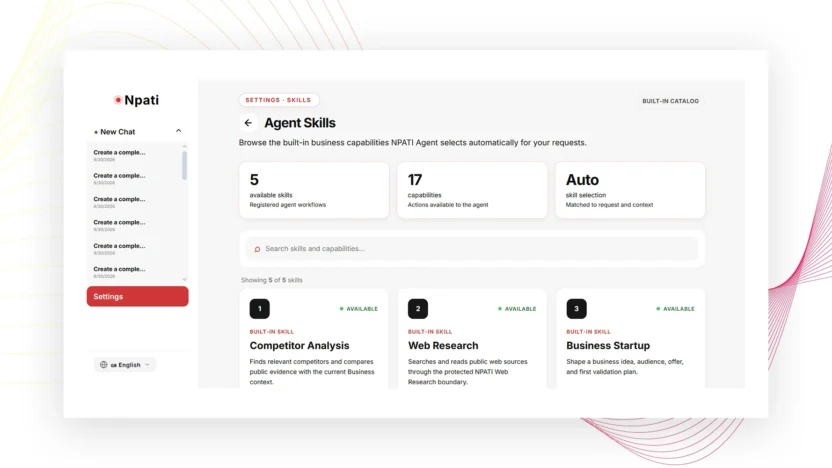
Skills in NPATI AI Agent provide a catalog of available agent skills, their descriptions, and the capabilities associated with them. The page helps you understand what kinds of tasks the system can support and how skills relate to underlying capabilities.
Open Settings → Skills. This catalog is for discovering and understanding available skills; it is not described as an installer for arbitrary third-party skills.
What the Skills catalog shows
Each skill can include a name, description, and related capabilities. The page can also show summary counters and information about automatic skill selection. This gives you a high-level view of the skills available in the current NPATI environment.
Because capabilities can change, use the current catalog rather than relying on an old list in documentation.
How to search Skills in NPATI AI Agent
- Open Skills.
- Enter a term in search.
- Search by skill name, description, or capability.
- Open or review the matching skill information.
- Clear the search to return to the broader list.
Searching by capability is useful when you know the tool area you need but do not know the exact skill name.
Skills vs capabilities
A skill describes a higher-level ability or workflow. A capability is an underlying tool or action that may support that skill. If you need to inspect capability status, risk, callability, or approval requirements, use Capability Inspector.
Do not assume that reading a skill description automatically gives every agent access to every related capability. Agent tools are configured separately in Company.
Automatic skill selection
The Skills page can show information about automatic skill selection. In practice, the best way to understand whether the intended skill is being used is to submit a real task and review the resulting execution instead of relying only on the catalog.
Verify a skill with a real request
A practical verification workflow is:
- Find the relevant skill in the catalog.
- Review its description and related capabilities.
- Confirm the target agent has the tools it needs.
- Send a small, specific test task.
- Open Activity & Run Trace.
- Inspect the delegated steps and tool audit.
- Compare the result with the expected behavior.
This turns the Skills catalog from a static reference into a testable part of your agent configuration.
Use Skills when designing an AI Company
When you create specialist agents, start with the task each role should perform, then review Skills and capabilities that support that task. Give each agent a clear role and only the tools it needs. This makes the company structure easier to maintain and troubleshoot.
For example, a research agent and an operations agent can have different roles, instructions, and tool access even though both exist inside the same AI Company.
Common Skills mistakes
Treating Skills as an arbitrary plugin installer
The described page is a catalog of available skills and capabilities, not an installer for any skill from the internet.
Assuming a listed capability is enabled for every agent
Review agent configuration and Capability Inspector separately.
Testing only from the catalog
A catalog description tells you what is available. A real request plus Activity trace shows what actually happened.
Next steps
Use Capability Inspector for detailed tool visibility, configure agents with the AI Company guide, and verify behavior through Activity & Run Trace.
For the NPATI AI Agent project and installation resources, visit the GitHub repository.
FAQ
Can I install any arbitrary skill from the Skills page?
The source interface describes Skills as a catalog of available skills and related capabilities, not as an installer for arbitrary external skills.
How do I know whether a skill worked?
Run a specific test task and inspect Activity & Run Trace to see the actual delegated steps and tool usage.