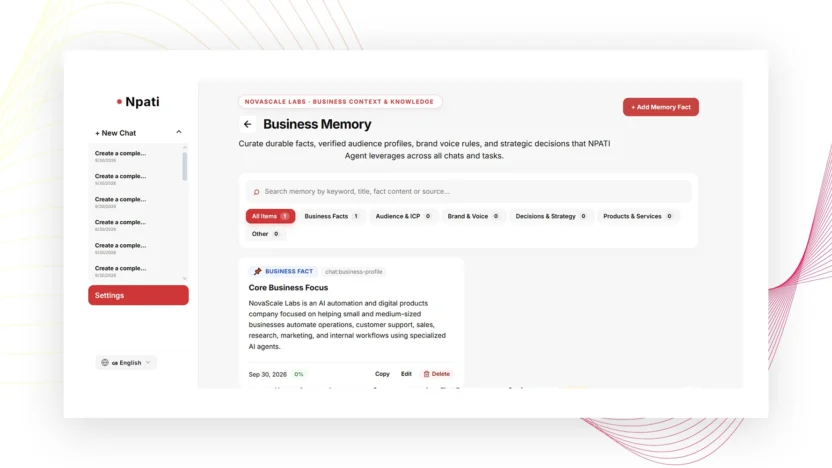
Business Memory in NPATI AI Agent stores confirmed facts about a specific Business Profile so important context does not need to be re-entered every time. You can add facts, assign a type, title, content and confidence, search them later, edit or delete records, and see where the information came from.
Open Settings → Memory. Always select the correct Business Profile first because these facts belong to the active business, not to every company or account globally.
Business Memory vs Company Memory
NPATI has two different concepts that are easy to confuse. Business Memory stores confirmed facts about the real business selected in Settings → Memory. Company Memory stores long-term facts and working rules for a specific AI Company.
A simple rule is: keep business facts in Business Memory and team-operating rules in Company Memory. Learn more about company-specific context in the AI Company guide.
How to add a fact to Business Memory
- Open Memory.
- Select the correct Business Profile.
- Select Add Fact.
- Choose the fact type.
- Enter a clear title.
- Add the confirmed fact or context.
- Set the confidence value appropriately.
- Select Save.
- Reopen or search for the fact to verify it was stored under the intended business.
Memory fact categories
The described interface includes categories for:
- Business fact
- Audience or channel
- Brand or preference
- Decision, experiment, or result
- Product
- Other
Choose the category that best describes the fact. Clear classification makes a growing memory base easier to search and review.
What confidence means
Confidence helps express how certain the stored information is. Use it to distinguish firmly confirmed business facts from information that may need additional verification. Do not use a high confidence value simply because a fact is convenient for an AI workflow.
Understand memory sources
A memory record can show its source. The described workspace can include manually added facts, onboarding information, or facts confirmed from chat. Source context is useful when you need to understand why the information exists and whether it should be updated.
Search, filter and copy business facts
The Memory page includes counters, tabs, search, source information, and a copy action. Use search when the business has many facts, and copy the text when you need to verify or reuse a confirmed record elsewhere.
Edit and delete memory carefully
Facts can be edited when business information changes. Deletion requires confirmation. Before changing a fact, confirm the selected Business Profile and make sure you are editing the intended record.
What belongs in Business Memory?
Good candidates include stable business facts, confirmed audience information, brand preferences, product context, documented decisions, and results that future workflows may need. Avoid storing invented data or temporary guesses as if they were confirmed facts.
For basic company identity and operational fields, use the Business Profile. Memory is better suited to additional confirmed context that should persist.
Use Memory with Goals and AI Companies
Business Memory becomes more useful when combined with Goals and a linked AI Company. Goals store measurable objectives, while Memory stores facts and decisions that provide context around those objectives.
Common Memory mistakes
Adding facts to the wrong business
Check the active Business Profile before every important edit.
Mixing company rules with business facts
Keep AI-team operating instructions in Company Memory instead.
Storing assumptions as confirmed facts
Only save information at a confidence level that matches the available evidence.
Next steps
Create the underlying profile with the Business Profile guide, connect business objectives through Goals, and use confirmed context when configuring an AI Company.
Explore the open project in the NPATI AI Agent GitHub repository.
FAQ
Is Business Memory shared with every business?
No. The Memory workspace is tied to the selected Business Profile.
Is Business Memory the same as Company Memory?
No. Business Memory stores business facts. Company Memory stores long-term facts and working rules for a specific AI Company.